

Integrating GIS and SAP Blog Series 5/10: Asset Work Integration
In this installment of our GIS and SAP® integration series we focus on asset and work integration for organizations with geographically dispersed assets.
Asset intensive organizations commonly have a Geographic Information System (GIS) as well as a robust Work Management application. Each system requires a repository of assets.
Benefits of integrating GIS for managing asset data and work include:
- Saving time and effort by automatically synchronizing data between SAP and GIS. Technicians can focus on data quality and governance and stop doing redundant data entry.
- Using asset location to help plan and schedule work. Seeing assets on a map helps planners create an efficient work sequence that minimizes travel time.
Let’s look at these in more detail:
Asset Master Data Management
Enterprise Resource Planning (ERP) systems for asset management (like SAP) and GIS (like Esri ArcGIS) need detailed data to function efficiently. The need for good data increases as reliance on the two systems increases.
Synchronize Data Using Mercury
Rizing’s Mercury solution ensures high quality results by synchronizing shared data between SAP and GIS. We built it based on years of experience delivering GIS/SAP integrations in several industries.
The benefits of using Mercury include:
- Reducing confusion by establishing a system of record for all asset data.
- Eliminating manual asset maintenance across multiple systems by automating the synchronization process.
- Reducing risks by programmatically administering data governance rules.
- Increasing productivity by unlocking EAM spatial functions for use in work planning and scheduling.
- Lowering costs by installing as a packaged solution, eliminating the need to build a complex custom interface.
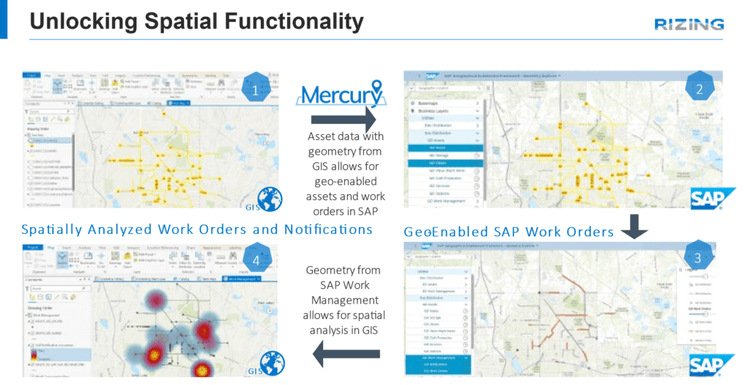
Even with integrated and synchronized data, GIS and SAP have unique strengths. Users can still perform their work in one system or the other without having to be proficient in both.
GIS Strengths:
- Spatial analysis
- Route optimization
- Location awareness
- Environmental awareness
Questions Best Answered by GIS:
- Where are my assets?
- How are they connected?
- What’s the most effective route to them?
- Where should new assets be installed?
- What major landscape features and attributes are they near?
- How can I group assets for efficiency?
SAP Strengths:
- Resource management
- Work management
- Asset traceability
- Cost tracking
Questions Best Answered by SAP:
- What state are my assets in?
- How do I maintain my assets?
- How do I fix assets that require repair?
- What is the work history for this asset and others like it?
- How do I manage costs associated with asset construction and maintenance?
- What are my preventive maintenance strategies?
Traceable, Verifiable, and Complete Data
We’re after traceable, verifiable, and complete asset – but as a means rather than an end. The end goal is having that data as a foundation for all the business processes that follow, including:
- Inspections
- Preventative maintenance
- Corrective maintenance
- Asset replacement
Work Management
Goals of work management are to:
- Maximize system uptime
- Extend asset life
- Reduce risk
Integrating GIS and SAP is the best way to achieve these goals.
SAP is well-known for its asset maintenance functionality including management of:
- Inspection work
- Preventive maintenance
- Corrective maintenance
- Capital work
- Spare part inventories
- Internal and external labor resources
- Repair histories and expenses
GIS adds:
- Access routes for hard-to-reach locations.
- Assistance with work schedule sequencing to minimize travel time between jobs.
- Alerts for when access requires special permits or permission from landowners.
- Notice of special equipment requirements for hazardous locations.
Geo Enablement Framework
One way to enable GIS functionality in SAP is the Geo Enablement Framework (GEF). GEF is a standard SAP product that provides access to map-based Enterprise Asset Management (EAM) transactions.
GEF offers many several advantages to SAP users:
- Enrich tabular business data with spatial awareness
The ability to see assets and work orders on a map in SAP can improve decision-making. For example, several smaller repair jobs that are close together might be combined into one bigger work order or included in a future capital construction project planned for that spot.Feature Classes from GIS can be displayed in GEF as Reference Layers. This additional spatial information lets technicians plan and schedule work more efficiently, or locate work based on crew location. - Initiate business transactions from a map
Creating notifications and work orders directly from a map is a powerful tool. For example, a technician in the field might come across an asset needing work but lacking a visible equipment number. Communicating their location to a coworker with access to a map of assets makes it simple to find the asset and generate a notification from the same screen. - Reduce reliance on asset structure hierarchy and naming convention
Depending on the structure of an organization’s asset hierarchy, navigating to a specific asset in an SAP backend transaction without knowing the functional location can be difficult. This is especially true in organizations that have a flat or underdeveloped hierarchy. Simply selecting an asset on a map and drilling into the details can save time. - Pull GEF business layers into GIS as map services for further analysis
Serving up work order and notification geometry and attribution as a map service for GIS is another benefit of GEF. With SAP managing the work and GIS accessing spatial work management data, technicians can use spatial analytics tools to uncover location-based insights about work. We talk about this more in chapter 8 of this series.
GEF Expansions
SAP allows custom extensions to the GEF Framework.
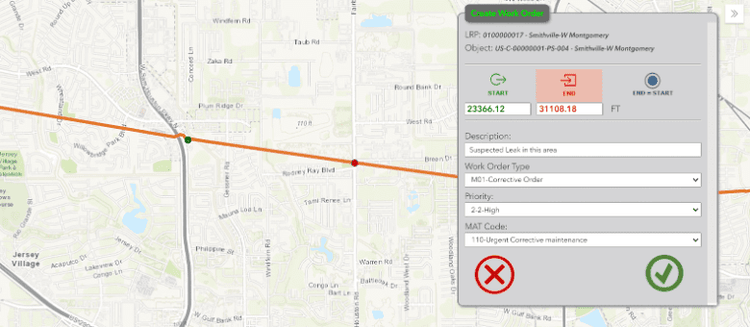
Rizing’s LAM – GEF Extension is an example of this in action. It allows selection of Notification or Work Order start and end points on a map. The linear values are updated automatically and are transferred to the notification or work order.
Industry examples of Business Challenges simplified by SAP-GIS integration:
Utilities
No industry has as much to gain by integration of GIS and SAP as Utilities. Any action that reduces the risk of wildfires or pipeline leaks is invaluable. Combining the work management of SAP, location information from GIS, and synchronized data between the two systems can lead to more efficient:
- Vegetation management
- Pole test & treat
- Right of way management
- Gas leak surveys
- and more
Oil & Gas
The amount of effort required to clean up environmental disasters like massive oil leaks is well-known. Accurately assigning and mitigating risk is critical to Pipeline Integrity Management.
Considerations for risk determination and remediation planning include:
- Pipe assessments
- Flow analysis
- Temperature and pressure sensor analysis
- Corrosion analysis
- Environmental influence analysis
Like the Utility Industry, work management functionality with SAP and location information in GIS have a role in pipeline integrity management.
Oil & Gas or Gas Utilities transporting hazardous liquids or gas under pressure are subject to regulations found in Title 49 of Code of Federal Regulations (CFR). Material Traceability requirements can be found in Part 192. Standard functionality in SAP and GIS with the data synchronization capabilities of Rizing’s Mercury provide a complete solution for Material Traceability.
Roads & Highways
A common example of the benefits of integrating SAP and GIS for Roads & Highways is road resurfacing projects.
Road repair history from SAP combined with road and surface condition data from GIS can help determine when and where to spend capital for road resurfacing or widening projects.
Rail:
Decisions to repair, reinforce, or replace sections of track come from analyzing data stored in SAP and GIS. SAP will have prior inspection and repair history while GIS will have track location information including soil conditions, weather conditions, areas with groundwater, etc.
Both systems may have data about the tracks and track installation. This data drives future inspection frequencies and helps prevent accidents. It can also help determine optimum speeds, train size, and train weight.
The ability to see work orders on a map allows planners to identify work planned for a specific location, which helps them schedule as much work as they can on that portion of track while it’s down for maintenance.
GIS also allows for polygonal representation of rail organizational territories (track inspectors, supervisors, etc.). Using this data with SAP helps the business right-size territories, as well as manage and query master data based on characteristics that were previously siloed from operations.
Conclusion
Providing dynamically synchronized integration of asset and spatial data through mobile solutions helps companies fully realize the power of SAP-GIS integration.
Assets in the real world can be matched with assets in the systems for efficient and effective management.
Data is updated on both sides, while SAP and GIS experts can keep working in the system best suited to them.
Up Next in the Series:
Learn how integrating GIS and SAP helps link asset health to environmental factors, enabling smarter inspections and preventive maintenance. Read now